

See what a mention actually says
Brand mentions in AI answers have context. Your company may be recommended for a use case, compared with a specialist or described with an outdated limitation. SearchSeal preserves the response so you can read the wording behind the mention and decide whether it reflects the current product accurately.
Start your review with claims that affect a buyer's decision. Look at the stated audience, supported tasks, plan conditions and regional coverage. Compare the answer with facts approved by the people who own the product or service. A recurring material error deserves a clearer task than a cosmetic difference in phrasing.
This approach makes AI brand visibility useful to the website owner. The question is not simply whether the name appears. It is what the response helps someone understand, which information needs a correction and which page is responsible for explaining it.
Monitor a stable set of buyer questions
SearchSeal checks AI Overview, ChatGPT, Gemini and Perplexity daily. Choose questions that cover discovering options, comparing alternatives and checking suitability. Keep a core set stable during the review period, with language and market aligned to the customers you serve. The repeated record helps you identify descriptions that recur.
Include both questions that name the brand and questions that do not. Branded follow-ups show how the company is explained once it is already in consideration. Category and use-case questions show which options appear without that cue. Review them separately when deciding whether the issue concerns presence or representation.
The collected answers come from the apps, with API fallback when an app answer cannot be collected. Keep that collection context with the date and question during review. The saved response provides the detail needed to investigate a change in a summary number.
Use rivals to understand the choice
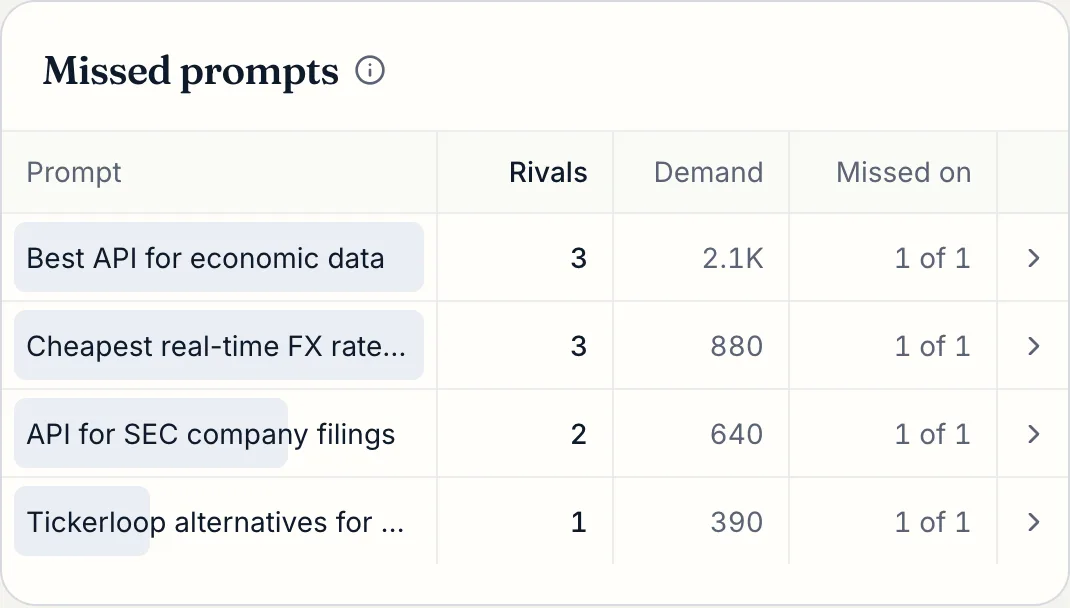
A rival appearing beside your brand can reveal the criteria an answer uses to explain a decision. Read which requirement each option is said to meet. Open the returned sources and inspect the facts supporting that comparison. The useful finding is a difference you can verify and explain to the customer.
For a fictional scheduling service, another product might be presented for complex staff allocation while yours is described around simple bookings. Confirm whether that distinction is accurate. If it is, clarify your intended audience. If your product supports the relevant workflow, check whether your public explanation makes the conditions clear.
The free site check can suggest a company, category and possible rivals from public information. Review those suggestions before choosing a tracked question set. A deliberate comparison set keeps the monitoring focused on businesses your buyers would actually consider.
Trace recurring descriptions to sources
SearchSeal keeps the source URLs returned with answers. Follow those links when a description is incomplete or outdated. You may find a current product page, an old directory entry or a guide that describes only one part of the offer. Record which page carries the fact you want to investigate.
Separate sources you control from those maintained by another publisher. Your own page can become a direct editing task. An independent article may need a factual correction request with a link to the authoritative explanation. Keep that dependency visible so the next review understands why the work is still open.
Use the citation tracking page for a closer explanation of mentions and source evidence. The monitoring workflow keeps the answer and returned links together so you can move from a recurring description to the specific information that needs review.
Prioritize the facts worth correcting
SearchSeal connects answer and page evidence to ranked fixes. Optional read-only Google Search Console data adds search demand to the decision. A recurring error on a commercially important question can then be reviewed alongside the page that should answer it and the searches already reaching that destination.
Choose one clear correction at a time. State the approved fact, the affected page and the condition the finished explanation must satisfy. Examples include clarifying supported regions, naming a required setup step or reconciling a plan limit across pricing and help pages. The task should be understandable without reopening the entire investigation.
You review and publish the final copy. Involve the person who can approve the product fact and the person responsible for the site. This keeps brand monitoring connected to accurate public information and gives the subsequent answer review a specific completed change to examine.
Follow the description after publishing
Mark the fix done and inspect the later answer observations attached to it. Read whether the relevant fact is explained accurately, whether the same sources return and how the company is positioned against the chosen rivals. Preserve examples that show both progress and unresolved issues.
A before-and-after sample describes observed answers and does not establish that your edit caused a change. Keep the concrete findings together: the page updated, the date published and the wording seen afterward. This gives the next reviewer a clear record of the decision.
If the description remains wrong, follow the available sources again and identify the next responsible owner. If it becomes accurate and stable, maintain the authoritative page and turn attention to another important question. The goal is a repeatable correction process with evidence at each step.
Keep the monitoring scope clear
SearchSeal focuses on the buyer questions you choose and the answers it collects. It is useful when an account owner wants recurring descriptions and competitor context to become website tasks. Crawler traffic, human AI referral analytics, social listening, team delegation and customer-facing PDF reports are outside the current product.
Keep traffic and conversion questions in the systems that collect those events. Keep actual crawler requests in trusted server or edge logs. The free user agent checker and robots.txt checker can help investigate identity and published policy when an access issue arises.
When comparing AI monitoring tools, ask what each observation represents and whether you can inspect the underlying record. Choose the workflow that fits your team's next decision. The comparison hub covers named alternatives, with current package details and guidance on when each is a better fit.
Keep a concise brand decision record
For each recurring description worth investigating, record the question, the relevant sentence and the approved fact. Add the page that explains it and the person responsible for that information. This short record makes it possible for a product expert to resolve a claim without reviewing an entire monitoring history.
At the next review, add the change published and an example of the later answer. Keep external correction requests open until the publisher responds or updates the page. Close website tasks when their acceptance conditions are met, while continuing to watch the question. The result is a maintainable history of how the brand was described, what the team changed and which issue deserves attention next.
Set up a review you can sustain
Starter costs $79 per month or $790 per year and includes 60 pooled questions. Pro costs $179 per month or $1,790 per year and includes 150 pooled questions. Max costs $399 per month or $3,990 per year and includes 400 pooled questions. The question allowance is shared across unlimited brands. Starter offers a seven-day trial with a card required. Review pricing for billing conditions and current capacity before choosing the plan that fits your question inventory.
Assign a regular review time and keep it focused. Start with recurring material errors, review their sources and select a few corrections with clear owners. Carry unresolved dependencies forward with dates. A short record of completed changes and observed answers is easier to maintain than a report nobody acts on.
Begin with the free competitor check, review the suggested context and choose the questions to track in a plan. Read AI search visibility explained to align the measurement language, or explore the visibility tracker for the wider answer-to-fix workflow.